Complex Coding Concepts: One of the biggest reasons as to why it is hard to solve coding assignments faster is that coding is filled with advanced concepts. Many students take time to fully understand arrays, trees, graphs, sorting algorithms, and OOP concepts before applying them in real-world programming. Recursive methods and optimization techniques need logical application and careful planning. Writing SQL queries and handling database normalization are other challenging areas.
Syntax & Logical Errors: Errors are a major obstacle to completing programming and coding assignments faster. Common examples of syntax errors that prevent the timely compilation or running of programs include incorrect variable declarations, misspelled keywords, wrong indentations, missing semicolons, and incorrect operators. These can generate confusing error messages that require extra time to fix. Logical errors are also problematic, like faulty conditions in loops, wrong algorithm implementation, etc.
Working with APIs: Understanding API documentation can be highly time-consuming. Students who want to know how to complete programming projects on time must develop skills in integrating APIs or Application Programming Interfaces. Every API has its own parameters, authentication methods, and response formats, and following them can take additional time. Apart from this, students need to handle authentication and configure the security measures, which can make the assignment more challenging.
Implementing Algorithms: As someone who wants to know how to complete programming assignments easily, you must focus on implementing algorithms efficiently. This is one of the common challenges that students face in different programming assignments, as different problems require different techniques like graph traversal, sorting, searching, and recursion. The next critical step is translating the logic into code, which requires handling loops and variables.
Understanding Assignment Requirements: Students may lose time when they begin coding before reading the brief, rubric, required inputs, expected outputs, and submission instructions. Misunderstanding one requirement can lead to unnecessary rewriting. Review the task carefully and list every required feature before opening your code editor.

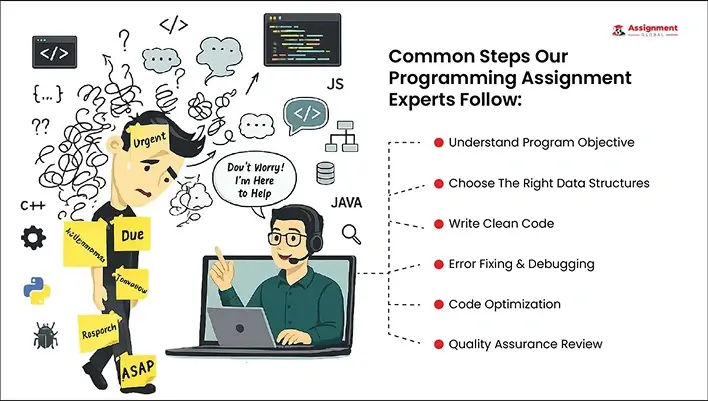
Seasoned Programmers
Error-Free Code Development
Efficient Debugging
Support With Project Planning
Algorithm Design Help
Read the Brief and Break the Task into Parts: Understand the requirements and break the larger coding assignments into manageable parts like input handling, logic and algorithms, output generation, and error handling. In this way, you can manage time better.
Plan Before You Code: Before writing the code for your program, create pseudocode, proper flowcharts, and logic diagrams, as they can help you organize the solution and make changes before coding. A clear plan can also help you solve coding assignments faster because you are less likely to rewrite large sections later.
Write and Test Small Modules: Instead of changing the code randomly after seeing error messages, test one section at a time and use the debugging tools that are provided by the integrated development environment (IDE). Systematic debugging improves code quality and saves time. Testing small functions separately also makes it easier to locate the source of an error.
Create Test Cases Early: Prepare normal, boundary, invalid, and empty-input test cases before the final stage. For example, if a program accepts a list of numbers, test one value, repeated values, negative values, and an empty list where applicable. Early testing helps you solve coding assignments faster and reduces last-minute surprises.
Practice Consistently: Practice makes you better prepared. This is true for coding and programming, as the more you solve problems on your own, the more you become familiar with programming syntax, common algorithms, and debugging patterns. Regular practice is one of the most reliable ways to build independence.
Start Early and Use a Simple Timeline: For students confused about how to complete programming projects on time, the most effective tip is to start early. You get enough time to figure out the algorithms and syntax to use, how to develop the code, debug, and revise it.
Day 1: Read the brief and list requirements
Day 2: Create pseudocode and choose tools
Days 3–4: Build the main functions
Day 5: Test normal and edge cases
Day 6: Refactor, document, and format
Day 7: Run a final review and prepare the submission files
Use External Support Responsibly: Apart from these, it may also be helpful to get programming assignment assistance for university students from professional experts at Assignment Global. Use this support to understand concepts, review your approach, debug your own code, or study a model reference.
Read the complete error message
Confirm variable names, types, and scope
Check brackets, indentation, and operators
Inspect loop conditions and stopping points
Print or inspect intermediate values
Test one function at a time
Compare expected and actual outputs
Check API responses and status codes
Review edge cases
Restart the IDE or environment when configuration issues are suspected
Visit Assignment Global for all academic support
No. Coding is a part, but programming assignments need problem-solving skills, the ability to design algorithms, API integration, debugging, and technical documentation.
By understanding the program requirements, creating a clear algorithm and flowchart, writing modular code, and using debugging tools, we can code faster.
By dividing the complex problems into simple functions, starting with basic coding, testing frequently, and planning the coding logic, you can complete programming easily.
Our experts offering academic assistance for programming students cover all types of languages, Python, C++, C#, Scala, Java, PHP, Ruby, and others.
Yes. Testing and debugging are both important to submit quality assignments, as it helps fix all types of errors, from logical flaws to runtime and syntax errors.
We accept